
 BotFrame

Build
Connect trusted nodes to create custom behaviour beyond fixed templates.
Connect Codex or Claude Code to build, simulate, test, and deploy your Discord bot. Every change stays in an inspectable workflow graph that you can edit yourself.
 CodexBotFrame connected
I’ll build it in BotFrame and test both support paths before deploying.
Your billing ticket is ready. @Billing has been notified.
Continue the conversation with the billing team.Your idea, running in your server.
Describe your bot to Codex.
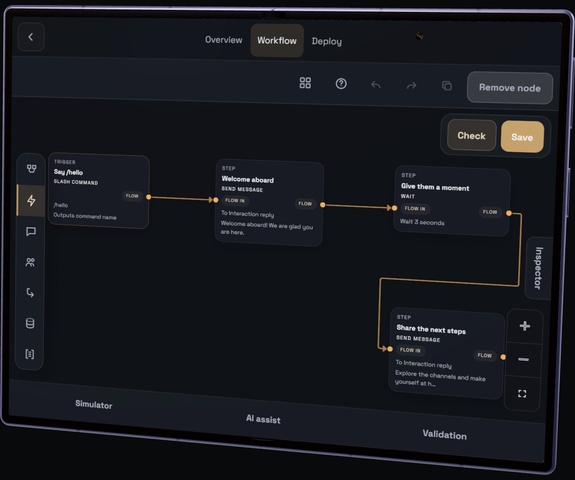
A static preview of the current workflow editor.
Connect trusted nodes to create custom behaviour beyond fixed templates.
Simulate events and validate every path before members ever see it.
Connect your Discord application and run it on managed hosting.
Publish without setting up a server. BotFrame keeps your bot online, monitors its connection, and handles recovery when something goes wrong.
Turn groups of steps into named custom nodes. Keep the big picture readable, then open any node to work on the details.
Explore custom nodes60 steps. One growing workflow.
60 workflow steps become six custom nodes, with the original logic inside.
BotFrame keeps the whole workflow visible while handling the hosting for you.
Control triggers, conditions, actions, data, and integrations on one graph.
Publish a tested workflow to your connected Discord application.
Run events safely and inspect the result before publishing.
Keep history, test a new version, and roll back instantly.
Build custom nodes, persistent data flows, and external integrations.
Connect Codex or Claude Code to build and test the same visible workflow you can edit yourself.
Ask your agent of choice to create or revise a workflow, run Discord scenarios in BotFrame's simulator, and check reference behaviors before release. Every node and connection remains visible, inspectable, and editable.
Add a support command with a billing branch.
Inspect every change on the graph, adjust a branch, and run the same workflow again.
Test a candidate, promote it when ready, and roll back immediately if you need to.
Build and host your first Discord bot.
One active bot for communities totaling up to 15,000 members.
For multiple bots and larger communities.
* Unlimited usage is subject to abuse guardrails and platform rate limits.
See how the graph editor, testing, publishing, and your bot identity work together.
AI builderPrompt to visual workflowUse AI to draft and revise the same visible workflow you edit yourself.
TemplatesStart from a working botExplore ticket, welcome, verification, reaction-role, and moderation workflows.
GuidesBuild step by stepFollow practical tutorials that connect real Discord outcomes to BotFrame nodes.
HostingKeep your own bot onlineRun your Discord bot without maintaining your own server.
DocumentationBrowse every node and triggerSee what each item does, how to configure it, and where it fits in a workflow.